16/12/2025
Matt Tomkin
Understanding Click-Through-Rate for LinkedIn Ads
LinkedIn is commonly associated with helping people to find a job and businesses for sourcing leading talent in their industry, but how does it fare on the marketing front?
Although the likes of Google and Facebook tend to be the go-to options for advertising, LinkedIn punches well above its weight. Per the latest statistics, advertisements on LinkedIn reach about 14% of the global marketing audience. Considering its user base falls far below that of the other major social media platforms, this is an impressive feat.
That leads us to the all-important question: How effective are ads on LinkedIn? In this guide, we go into the click-through-rate (CTR) of LinkedIn ads to help you determine whether they are worth investing in.
How CTR on LinkedIn ads are tracked
CTR is tracked on LinkedIn much like any other platform. The formula is:
CTR = (Clicks / Impressions) x 100%
What counts as a click varies by campaign objective, such as whether you’ve set your campaign to drive website visits or brand awareness.
Experts have found that LinkedIn ads see a 33% increase in purchasing intent for brands and up to a 300% increase in their brand attributes. Additionally, marketers have reported a 200% increase in their conversion rates when compared to other platforms.
The average click-through rate for LinkedIn ads
Defining average CTR for LinkedIn ads isn’t an exact science because you’ll see various marketing agencies arriving at different conclusions. Generally, a Sponsored Content ad will have a 0.44% CTR, which varies by industry and ad format. What all such studies have in common is that they never surpass 1%.
Even though this sounds incredibly low, it’s vital to remember that CTR itself is just one part of the puzzle. A CTR that falls under 1% is appalling if the people clicking aren’t interested buyers, whereas it’s excellent if all of those people clicking have a high chance of taking action.
But how does CTR change by industry? This is where the picture gets murkier, which is why we’ve aggregated the data from several sources to arrive at the following averages for global advertising in the following industries:
· Law – 0.4-0.6%
· Insurance – 0.5-0.56%
· Professional Services – 0.39-0.65%
· IT/Software – 0.64-0.66%
· Finance – 0.5-0.88%
Generally, Sponsored Content and image ads tend to perform the best, with text-based ads performing the worst. None of these numbers are impressive on paper, but marketers consistently cite LinkedIn ads as one of their best-performing channels. According to one journey-mapping company, LinkedIn ads delivered a 113% return on ad spend (ROAS).
What would be classed as a good CTR for LinkedIn ads?
Good CTRs should be benchmarked based on the overall average for the platform and ad type, alongside the average CTRs for your specific industry. Generally, anything over 1% is considered good, and anything over 2% is exceptional.
What affects CTR on LinkedIn ads?
Not getting the CTR you’re expecting on your ads?
If you feel like you’re wasting your money marketing spend on LinkedIn because you’re not getting the response you expected, it’s time to dive into the factors that actually influence your CTR.
Any marketer who’s up to snuff will begin by investigating each of the following:
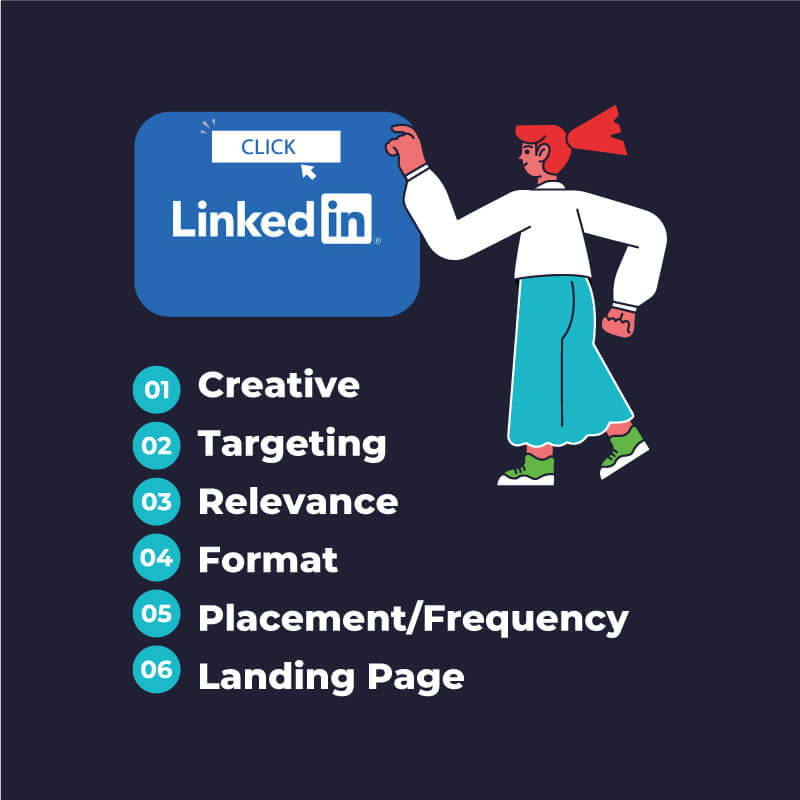
Ultimately, the problem can’t be diagnosed by assumptions. Marketers might think they know what the problem is, but you can only confirm it through in-depth A/B testing. That means trialling different copy, visuals, CTAs, and even individual landing pages.
Improving LinkedIn ad performance and CTR
Your CTR is bound to improve when you build your creative processes and testing around real data. Gut feeling rarely ends with positive results in today’s world, which is why achieving high CTR and conversion rates immediately is incredibly rare and should be considered the exception rather than the rule.
Here are a few ideas for how you can begin refining your ad performance and improving your ROAS:
Begin broadly but refine quickly
Start any campaign by testing out multiple audience segments early. When CTR begins climbing, double down and see whether those results hold. Don’t get tempted to over-optimise during the earliest stages.
Test creative types
You could be duplicating your ads and changing one element of them. Only ever change one element at a time to see how those tweaks impact your ads. It could be a headline, image, or CTA.
Synchronise with audience cycles
Audiences naturally decay over time as ad fatigue kicks in, but each cycle doesn’t run at the same tempo. Whether it’s a cold audience, in-market audience, or a retargeting audience, establish new campaigns based on the lifespan of each audience.
Optimise for eye-catching content
The key to CTR is content that stops the scroll. Focus on the type of content that stops that motion through chart visuals, first-line hooks, and direct contrasts to your competitors. That’s the first step to chasing conversions.
Unfortunately, this is the type of exercise that so many busy professionals either don’t understand or don’t have the time to do. Instead of wasting your ad spend, consider outsourcing to a professional team, like Tao Digital Marketing, that can create, run and optimise your ads in the background.
If you’re interested in learning more about running LinkedIn ads that don’t just earn clicks but earn conversions, get in touch with Tao Digital today.